EnduranceLab
Train. Test. Perform.

Train. Test. Perform.

Remote tests

Test where you train. Do the Endurance Lab protocol on your own bike, track or pool, upload your file, and get a full report: your thresholds, training zones, fuel and lactate by zone, a race predictor, goals and an automatic review.

See prices

The Endurance Lab protocol

Bike — Critical Power

20 s sprint + 3 min + 12 min all-out

CP, W′, metabolic profile

Run — Critical Speed

1,200 m + 3,600 m, optional 15–20 s sprint

CS, D′, pace zones, metabolic profile

Swim — CSS

400 m + 200 m

CSS and swim zones (metabolic profile coming soon)

How to do the bike test

Bike Critical Power (CP) test

Two all-out efforts on the same ride give your Critical Power and W′ (your anaerobic reserve). A short sprint before them lets us estimate your metabolic profile too.

The session

  1. Warm up for 15 to 20 minutes, easy, with two or three short 10-second pick-ups.
  2. Sprint 20 seconds all-out from a slow rolling start, seated or standing. Make it the first hard effort of the day. Your device must record every second (1-second recording).
  3. Ride 10 minutes easy (Zone 1).
  4. Ride 3 minutes all-out.
  5. Recover fully, for at least 10 minutes, pedalling easily.
  6. Ride 12 minutes all-out.
  7. Cool down for 10 minutes easy.

Pacing

All-out but even. Start hard but controlled, hold the highest power you can sustain to the end, and empty the tank in the final minute. Do not start in a sprint and fade.

Before you start

  • Power meter or smart trainer recording power. Do a zero offset (calibration) before the warm-up.
  • Same bike and same set-up for both efforts. Indoors: fan on, ERG mode off.
  • Press the lap button at the start and end of each effort. It makes marking easier.

Export the original FIT file

Garmin Connect
Open the activity on the website, click the gear icon, then Export Original. Unzip it and upload the .fit file.
Wahoo
In the ELEMNT or Wahoo app, open the workout, tap Share and choose the .fit file.
Zwift
On zwift.com, go to My Profile, then Activities, open the ride and choose Download .fit file.
Coros
In the Coros app, open the activity, tap the share icon and choose Export Data, then .fit.
Suunto
In the Suunto app, open the workout, tap the three dots and choose Export .fit file.
TrainingPeaks
Open the workout, go to Files and download the original .fit file (not the TCX or GPX).
How to do the run test

Run Critical Speed (CS) test

Two all-out efforts in the same session give your Critical Speed and D′ (your anaerobic distance reserve). An optional short sprint lets us measure your sprint engine (VLamax) too.

The session

  1. Warm up for 15 to 20 minutes easy, with four relaxed strides.
  2. Optional: sprint 15 to 20 seconds all-out on a flat stretch, then walk or jog 10 minutes easy. Your watch must record every second (1-second recording).
  3. Run 1,200 m all-out.
  4. Recover for at least 10 minutes (20 to 30 minutes is ideal), walking or jogging easily.
  5. Run 3,600 m all-out.
  6. Cool down for 10 minutes easy.

Pacing

All-out but even. Find the fastest pace you can hold for the whole distance from the first lap, and finish strong. Avoid a fast first 200 m.

Before you start

  • Use a running track or a flat, traffic-free route with few turns.
  • GPS watch with a clear sky view, or a calibrated footpod. Track mode on the watch if it has one.
  • Press the lap button at the start and end of each effort.

Export the original FIT file

Garmin Connect
Open the activity on the website, click the gear icon, then Export Original. Unzip it and upload the .fit file.
Wahoo
In the ELEMNT or Wahoo app, open the workout, tap Share and choose the .fit file.
Zwift
On zwift.com, go to My Profile, then Activities, open the ride and choose Download .fit file.
Coros
In the Coros app, open the activity, tap the share icon and choose Export Data, then .fit.
Suunto
In the Suunto app, open the workout, tap the three dots and choose Export .fit file.
TrainingPeaks
Open the workout, go to Files and download the original .fit file (not the TCX or GPX).
How to do the swim test

Swim Critical Swim Speed (CSS) test

A 400 m and a 200 m time trial give your Critical Swim Speed, the pace you can hold for long threshold sets.

The session

  1. Warm up for 10 to 15 minutes: easy swimming, drills and two or three short build lengths.
  2. Swim 400 m all-out, push start.
  3. Recover for at least 5 minutes (5 to 10 minutes), easy swimming or resting.
  4. Swim 200 m all-out, push start.
  5. Cool down for 5 to 10 minutes easy.

Pacing

All-out but even. Hold your best sustainable pace from the first length; no sprint dive starts.

Before you start

  • Watch in pool-swim mode with the correct pool length set before you start (for example 25 m or 50 m).
  • Press the lap button at the start and end of each effort, or rest at the wall so the watch records a rest.
  • Swim in a quiet lane if you can so you are not slowed by other swimmers.

Export the original FIT file

Garmin Connect
Open the activity on the website, click the gear icon, then Export Original. Unzip it and upload the .fit file.
Wahoo
In the ELEMNT or Wahoo app, open the workout, tap Share and choose the .fit file.
Zwift
On zwift.com, go to My Profile, then Activities, open the ride and choose Download .fit file.
Coros
In the Coros app, open the activity, tap the share icon and choose Export Data, then .fit.
Suunto
In the Suunto app, open the workout, tap the three dots and choose Export .fit file.
TrainingPeaks
Open the workout, go to Files and download the original .fit file (not the TCX or GPX).
What you get

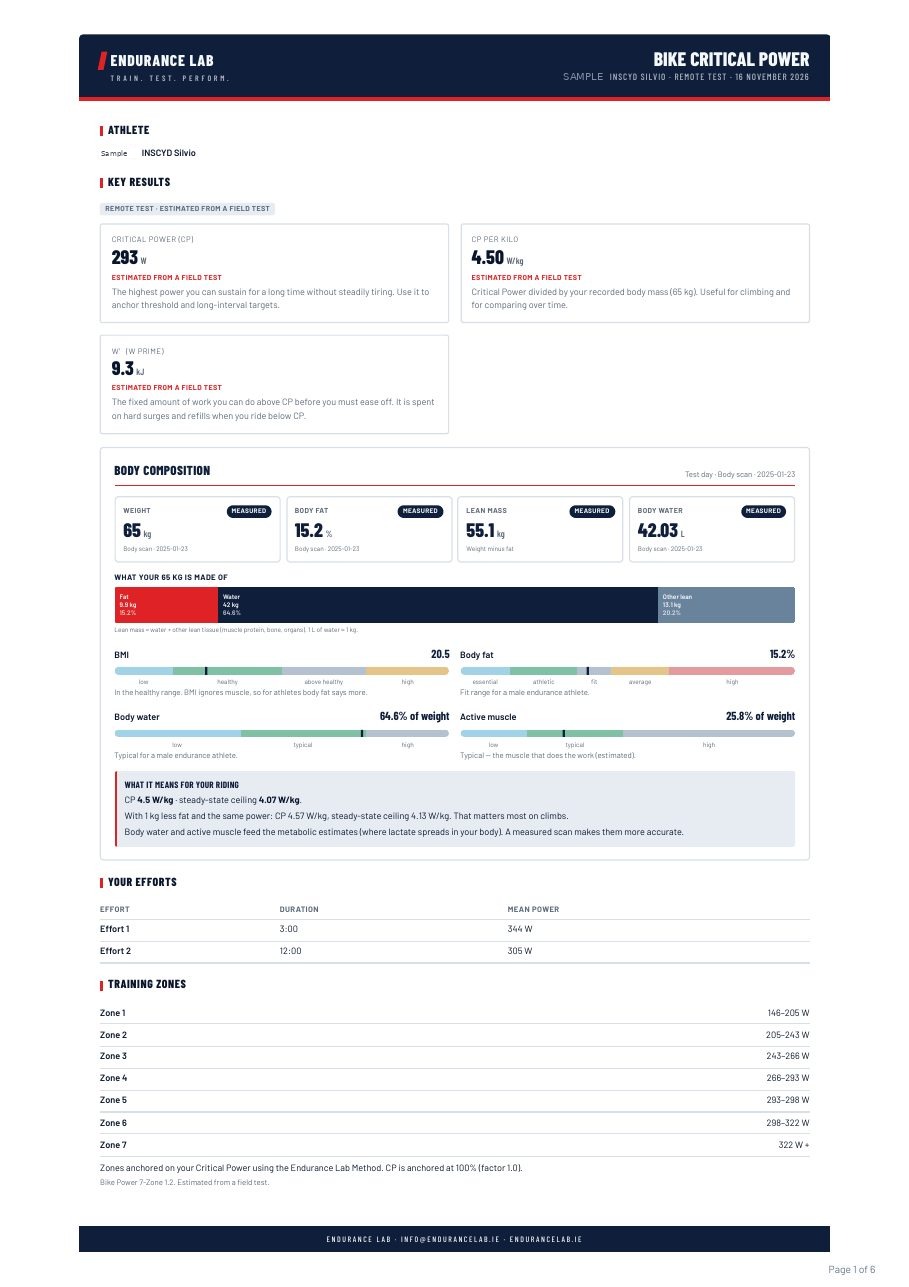
Sample report page: Key results and body composition
Sample report — Key results and body composition
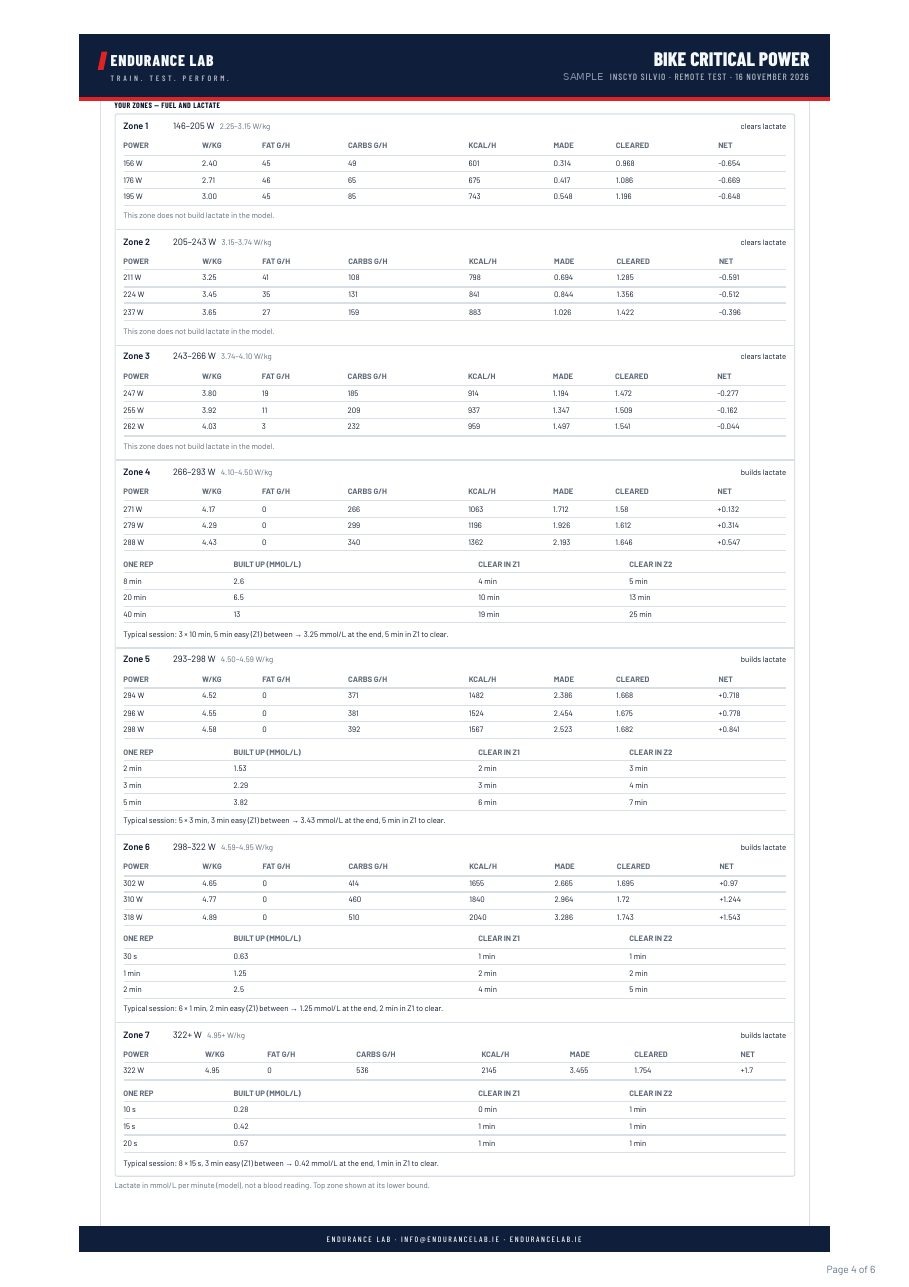
Sample report page: Zones with fuel and lactate
Sample report — Zones with fuel and lactate
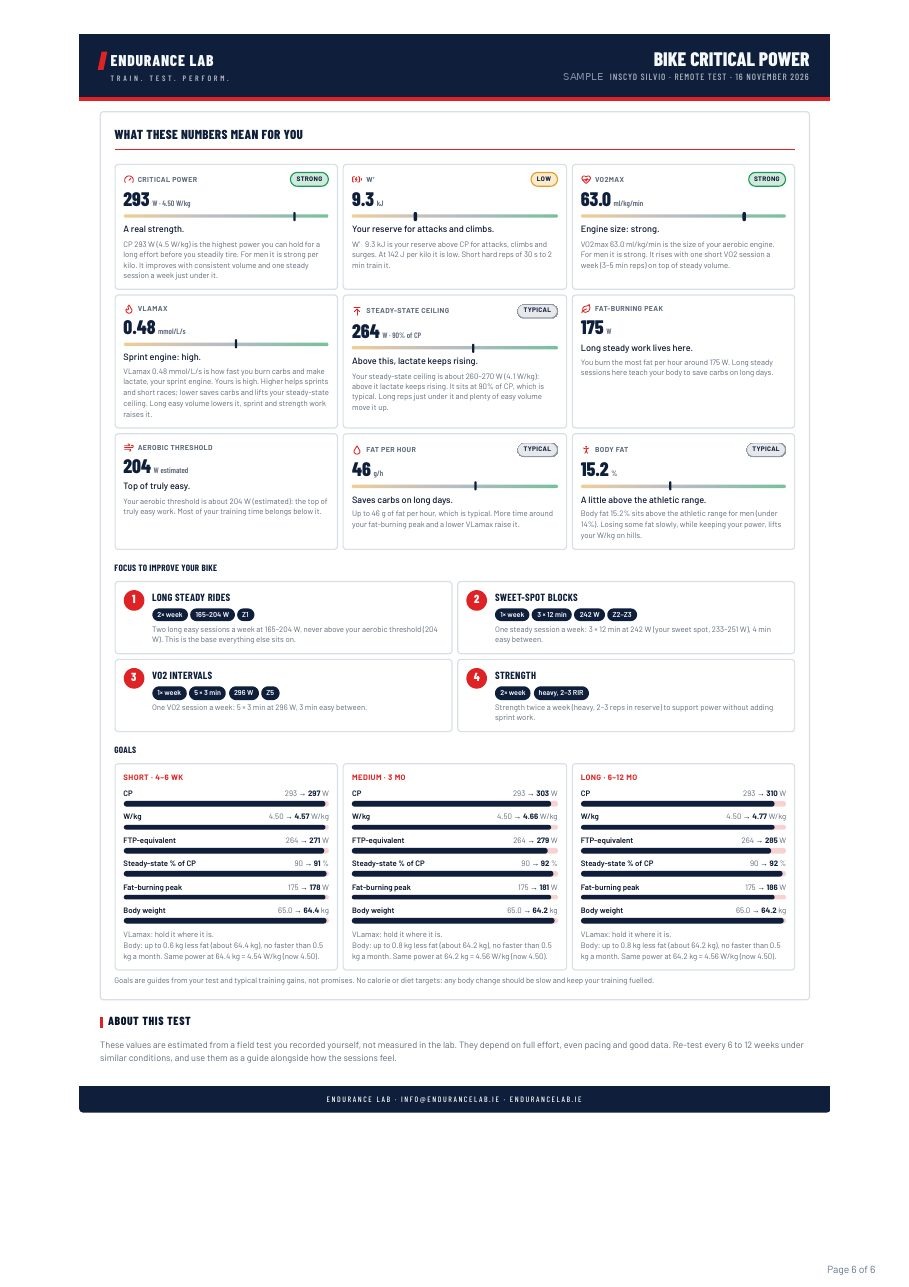
Sample report page: What it means and your goals
Sample report — What it means and your goals

Prices

Remote test prices don't combine with other offers.

FAQs

What do I need?

Bike: a power meter or smart trainer recording every second. Run: a GPS watch (a track is best). Swim: a pool and a watch or a friend with a stopwatch. You upload the .FIT file from your device.

How accurate is it compared with a lab test?

Critical Power, Critical Speed and CSS from a well-paced field test are reliable training anchors. Metabolic values (VO2max, VLamax, steady-state ceiling, fat-burning peak) are estimated with the Endurance Lab model from your file — a lab test measures them directly.

What if my file isn't good enough?

You check the file before using a credit. If the efforts can't be found or look sub-maximal, you see what to fix and can re-do the test. Your report generates automatically after the checks pass and your body weight is provided; one credit is used only when the report is generated.

Is a review included?

Yes — an automatic review written from your own numbers is generated with your report and appears straight away.

How long are credits valid?

12 months from purchase. One credit = one test in any sport. Swim reports give CSS and training zones; the swim metabolic profile is coming soon.

Can I get a refund?

Unused credits can be refunded — contact info@endurancelab.ie. Credits already used for a report are not refundable.